Do you want to change the DNS settings of your Namecheap account? Follow these simple steps to learn how to manage Basic DNS for your domain. If you have bought a domain from Namecheap and want to host or point it to an external server, then you will have to update the DNS. Let's find out how to manage it in less than a minute.
Steps to Change Nameservers on Your Namecheap Account
- Type Namecheap.com in your browser and hit Enter.
- Click on SIGN IN, located on the top left-hand side.

- A small pop-up login page will open. Enter your Username and Password and click on Sign In.
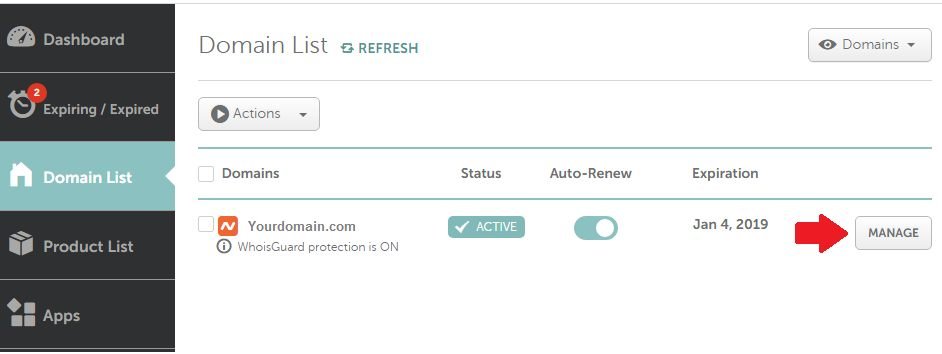
- After successful login, click on "Domain List" located on the left-hand side of the page.

- Now the Domain List page will open. Click on the Manage button beside your domain, as shown in the image below.
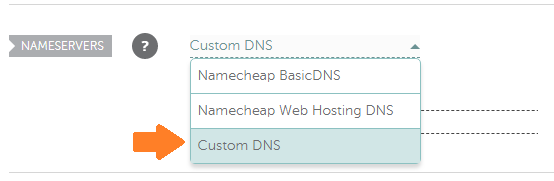
- Just beside the Nameservers option, choose Custom DNS from the drop-down menu.
- Enter your DNS in the provided Nameserver 1 and Nameserver 2 fields and click the checkmark button.

It's done! It will take about 1-2 hours to propagate globally.
Following this method, you can easily update the DNS on your Namecheap account.
Verifying That Your DNS Change Has Propagated
Instead of guessing whether the change has gone live, use a free propagation checker like whatsmydns.net. Enter your domain and select "NS" as the record type — you'll see a live map of which regions around the world have already picked up your new nameservers. This is far more reliable than repeatedly refreshing your browser, which may just be showing you a cached version of your old site.
A couple of things worth knowing before you make this change:
- Update both Nameserver 1 and Nameserver 2 together, not one at a time — a mismatched pair can cause intermittent resolution issues.
- If your domain also handles email (MX records), make sure the new host has those records configured before you switch, or you risk incoming mail bouncing during the transition.
- Keep a note of your old nameservers until you've confirmed everything (site + email) is working correctly on the new ones, in case you need to roll back quickly.